

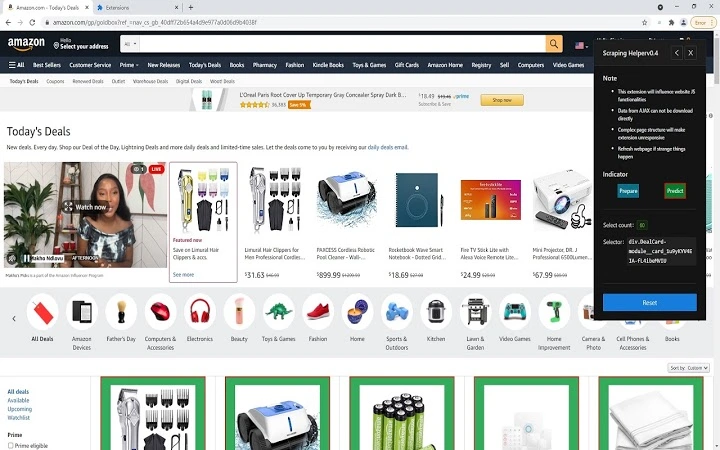
Description
Auto-Generate Minimal HTML Selectors for Web Scraping
Overview
The software is designed to streamline the process of extracting structured data from web pages by automatically generating minimal HTML selectors based on user-selected elements. Its primary purpose is to assist developers and data analysts in quickly identifying and isolating relevant content during web scraping tasks. The tool supports direct integration with popular data extraction frameworks such as Python’s BeautifulSoup, enabling seamless workflow transitions from selection to code generation.
Target users include web developers, data scientists, and automation engineers who frequently work with HTML content and require efficient methods for parsing and retrieving specific data points. The application is particularly useful in scenarios involving repetitive data extraction from dynamic or complex web interfaces, where manual selector creation can be time-consuming and error-prone.
As a developer preview (Alpha version 0.3), the software is currently in an early development phase. The developer did not provide additional background information. Performance and stability may vary, and users are advised to exercise caution when relying on the tool for production-level tasks. The tool is intended for testing and prototyping rather than mission-critical operations.
Key Features & Capabilities
- Auto-Generated Selectors: Automatically calculates and outputs minimal jQuery selectors based on the selected HTML element, reducing the need for manual trial-and-error.
- Python Compatibility: Generates code snippets compatible with BeautifulSoup, allowing direct use in Python scripts without additional parsing.
- Real-Time Preview: Provides immediate feedback on selected elements, enabling rapid iteration during content analysis.
- Minimal Selector Output: Prioritizes concise and efficient selector syntax to improve code readability and reduce parsing overhead.
- Browser Integration: Functions as a browser extension, enabling in-context selection and extraction directly from the webpage.
For example, when analyzing a product listing page, users can click on a specific item’s title, and the tool instantly returns a clean selector such as div.product-title:nth-child(2). This selector can then be copied into a Python script using BeautifulSoup to extract all titles from the same class or structure. The tool is especially effective during early-stage data discovery and validation phases.
User Interface, Workflow & Performance
The user interface is built around a browser extension model, offering a minimalistic design focused on core functionality. Navigation is straightforward, relying on a single activation button within the browser toolbar. Once triggered, users can click on any visible HTML element on a webpage, and the tool processes the selection in real time.
Workflow efficiency is enhanced by the direct output of ready-to-use code, minimizing the gap between visual selection and implementation. The tool does not require configuration or setup beyond installation, making it accessible to users with varying levels of technical expertise.
The developer did not specify resource usage details. Performance observations are based on general software behavior patterns. Stability may be impacted due to the alpha status, and users should expect occasional disruptions or unexpected behavior. No specific CPU or RAM usage data was provided.
Compatibility & System Requirements
The software is compatible with Windows and Mac operating systems. It functions as a browser extension, meaning its operation depends on the host browser’s capabilities. The installation size is 1.2 MB, indicating a lightweight footprint.
Exact system requirements were not listed. Compatibility information was partially provided. Users should ensure their browser supports extension development and has JavaScript enabled. No additional hardware or software dependencies were mentioned.
Pros and Cons
Pros
- Automatically generates minimal and efficient HTML selectors
- Directly outputs code compatible with Python BeautifulSoup
- Lightweight at only 1.2 MB
- Intuitive browser-based workflow with real-time feedback
- Free to use, with no licensing barriers
Cons
- Alpha version (0.3) – not recommended for production use
- Stability and reliability may vary across different web pages
- Developer background and support channels are not publicly available
- Limited documentation and user guidance
- Performance and resource usage details not disclosed
FAQ Section
Is this tool compatible with my browser?
The software is designed for use as a browser extension and supports Windows and Mac. Compatibility depends on the browser’s extension framework and version. Ensure your browser is up to date and supports extension development.
Can I use the generated selectors in Python scripts?
Yes. The tool generates selectors that are compatible with Python’s BeautifulSoup library, enabling direct integration into data extraction workflows without manual conversion.
Is the software safe to install?
As a browser extension, the tool requires permissions to access webpage content. Users should only install it from trusted sources. The developer did not provide information about security practices or data handling.
Does the software require an internet connection?
The tool operates locally within the browser after installation. It does not require an ongoing internet connection to generate selectors or output code.
How often are updates released?
Updates are not scheduled or publicly disclosed. As an alpha version, the development cycle is irregular, and users are advised to check for updates manually.
Final Thoughts + CTA
While still in early development, this tool offers a promising approach to simplifying the often tedious task of crafting HTML selectors for web scraping. Its ability to generate minimal, BeautifulSoup-ready code directly from browser selections represents a significant time-saving advantage for developers and analysts. However, its alpha status means users should treat it as a prototyping aid rather than a production-grade solution.
For those working on data extraction projects and seeking a lightweight, free tool to accelerate initial analysis, this software delivers tangible value. It is best suited for technical users who understand HTML structure and are comfortable with experimental software.
Download Auto-Generate HTML Selectors for Web Scraping now
Guides & Tutorials for 数据抓取分析工具 (Scraping Helper) Extension for Chrome
How to install 数据抓取分析工具 (Scraping Helper) Extension for Chrome
- Click the Preview / Download button above.
- Once redirected, accept the terms and click Install.
- Wait for the 数据抓取分析工具 (Scraping Helper) Extension for Chrome download to finish on your device.
How to use 数据抓取分析工具 (Scraping Helper) Extension for Chrome
This software is primarily used for its core features described above. Open the app after installation to explore its capabilities.
User Reviews for 数据抓取分析工具 (Scraping Helper) Extension for Chrome 0
No reviews found





